Burn SRT subtitles into an MP4
Have the final cut and a corrected subtitle file? Bake the words into the picture so anyone who plays the MP4 sees them. The export runs on your device, with no account, upload or watermark.
Burn your subtitles into an MP4
Play the four-second sample or choose your own video and subtitle file. Edit the words or timestamps below to change the result.
Loading video…
Check the timing with a four-second example
The speaker likes the blue label, then chooses green for print. The first caption appears at 0.20 seconds. At 1.52 seconds the picture is clear. The second caption appears at 1.56 seconds and clears by 3.76 seconds. Those two frames around the pause are a quick way to catch a subtitle that lingers over the next phrase.
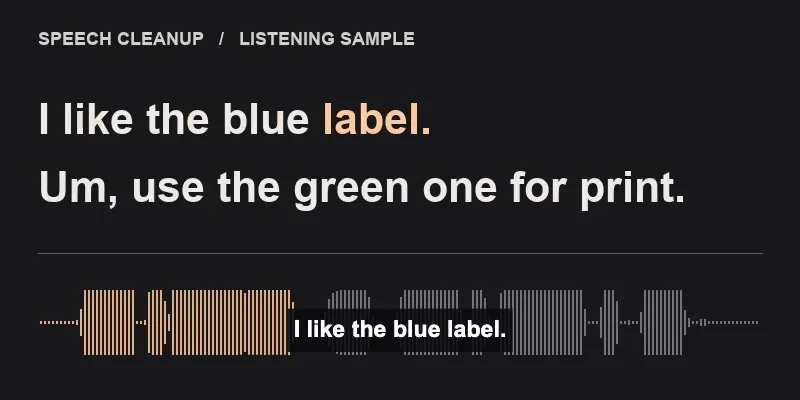 1.44 s
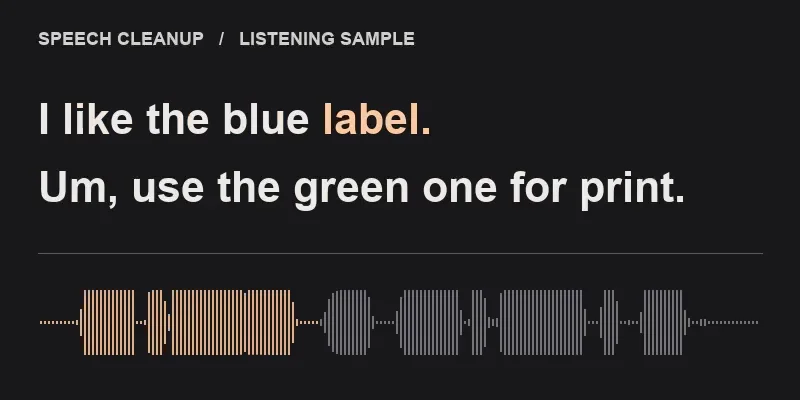 1.52 s
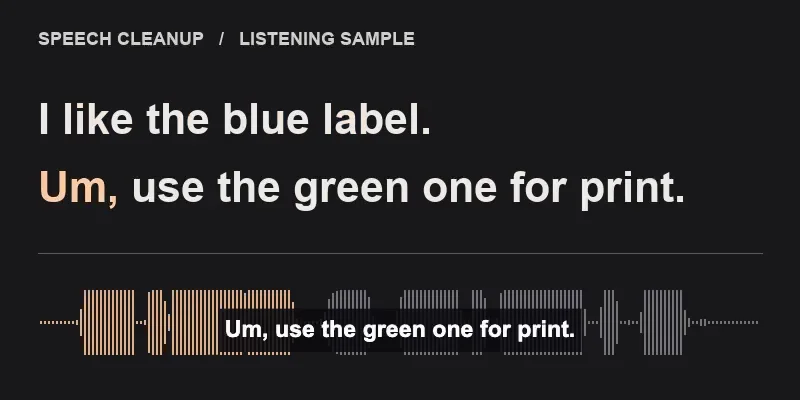 1.56 s
Deliver captions that survive reposting
Use the exact cut you plan to publish. If every line appears late by the same amount, shift the SRT timing. If the delay starts after one cut, listen on both sides of that cut and adjust the affected cues. Keep your original and revised files so you can compare exactly what changed.
Place the captions at the top if they cover a name or demonstration at the bottom. Break long lines at a natural pause in the text box. Play the exported file at phone size. Keep a copy of the SRT for viewers who want selectable subtitles or a different language.
Which files work?
Choose a browser-playable video up to two minutes long and a numbered, plain-text SRT under 1 MiB. The editor uses the words, line breaks and cue times. It draws white text on a dark background. The H.264 MP4 keeps the aspect ratio and fits within 1920 pixels on its longest side. Export requires a browser with compatible video encoding, such as desktop Chrome or Edge.
Need captions from speech?
In Valmera Studio, upload your footage and ask the editing agent to transcribe it. AI editing requires a subscription. Use this brief to start with readable captions and a spelling review.