Valmera vs Krater for AI video editing and revisions
Choose Valmera when a client is likely to revise an approved timeline and you want an editable project with reviewable versions. Consider Krater when you prefer to attach clips in chat and get a finished file directly. If you edit the same kind of video every week, try a second recording and one targeted correction before deciding.
Valmera publishes this comparison. We inspected two actual Valmera exports. The Krater workflow comes from its product documentation and its own recorded example, reviewed November 25, 2026.
Choose between a project revision and a direct file
| Decision | Valmera | Krater |
|---|---|---|
| First delivery | Upload footage and direct the edit by chat. Review the preview and export the approved project version. | Attach footage in chat. Describe the desired cut and ask for the finished file. Krater documents running media tools in its own environment. |
| Specific client correction | Name the project version and output times. Make the change in that project and inspect the eventual MP4. | Krater’s walkthrough describes asking for changes in the conversation. Keep the first file so you can compare it with the next delivery. |
| Repeat the brief | Keep the brief, approved review points and delivery format together. Try the next upload with the same constraints. | Krater documents saving a reusable chat instruction as a skill. Verify that a second source keeps the requested title placement, framing and output format. |
| Plan a fair test | Try a first draft and one revision that preserves an approved choice. Save the rendered files. | Use the same footage. Record the minutes spent on both passes and the total credits shown in your own account. |
Krater’s video editor · Krater’s documented edit and follow-up workflow · Attachment and storage guide.
Inspect four matching times in the delivered files
A Valmera-connected assistant removed one fictional offer title at 12–16 seconds. Both 1080 × 1920 exports last about 24.56 seconds. The original clip has no detected speech. Select each checkpoint to compare the shot, the credit and the ending.
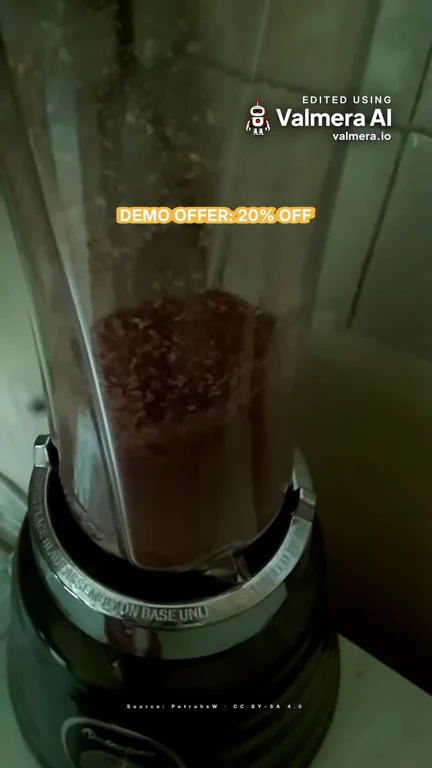
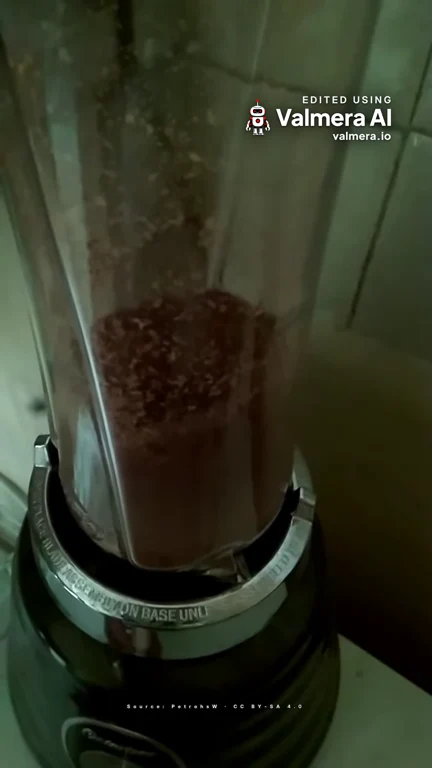
The offer appears in version 5 and is gone from version 6. The source credit remains at the bottom.
At 14 seconds, 20,044 pixels changed by 16 or more grayscale levels in the band containing the offer. At that frame, none outside the band reached that threshold. Some pixels differed slightly elsewhere. At 11 and 22 seconds, the entire sampled grayscale frame matched. The two decoded stereo audio streams matched when we decoded both files with the same settings. This samples four frames and compares the full audio outputs. It leaves continuous picture review to the viewer.
Download version 5 · Download version 6 · Read the pixel and audio measurements · Read the recorded Valmera operations.
Coffee footage by PetrohsW. Valmera added the source credit and fictional offer, then removed only the offer. These stills are scaled from the recorded exports. Original footage · CC BY-SA 4.0.
Run a two-delivery trial with client footage you can share
- Use the same 30- to 60-second source and keep a copy of the first approved MP4. Set a hard duration if the destination has one. Agree what stays in the film after changes.
- Give each editor the same single change and ask for a new file. Check a point before the change, a point within it, a point afterward and the ending. Listen where the soundtrack runs through the change.
- Start a fresh job with a second recording and the original brief. Check whether the same approval steps, format and title treatment carry over. Record operator time, review cycles and delivered bytes for both jobs.
Download the two-delivery trial sheet for the first draft, client revision and follow-up job.
Give each editor the same first request
Use my uploaded footage to make a vertical 15-second product clip. Keep the action that shows the product working and its result. Add the approved offer as its own title during the demo. Preserve the existing disclosure and take the audio from the supplied clip. Show me the first draft and identify the version.
Replace the fictional offer and disclosure with approved client copy. Read the first-edit guide
Test one tightly scoped revision
In the project and approved version I specify, remove only the editable offer title at the output times I provide. Preserve the source ranges, framing, disclosure and audio. Show the passage in context before exporting the revision. Deliver the final MP4 and give me both versions so I can confirm what changed.
Send a batch of client videos for editing
If your team has recurring work, send one shareable source, a priority revision, how many masters and variants you need each month, and the first review deadline. Valmera Enterprise can scope an editing pilot with you.
Discuss recurring client video revisions